
Walk onto any mid-scale or large U.S. construction job today, and you’ll find teams no longer working off isolated drawings. They’re working inside shared building models that combine everything from procurement to field execution.

Why is it so?
It’s because the US construction industry loses approximately $177 billion annually to poor project data and miscommunication. Margins are getting tighter, so builders need to create Revit families. It’s a move from digital sketches to intelligent, data-rich components.
A Revit Family contains the exact dimensions and manufacturer specifications, highlighting the data of a real-world building part.
Let’s learn more about creating Revit families and why they are important in BIM projects.
What Is Revit Family Creation?
Revit family creation is a process in which teams build components that match actual building parts rather than placing generic objects into the model.
A door will have real dimensions, while the washing machine or refrigerator will include the manufacturer’s specifications. Even the lighting fixture includes mounting requirements that affect ceiling coordination.
Unlike basic CAD drawings that show only lines, these are smart objects that carry actual information about materials, dimensions, cost estimates, and performance specs.
The Impact of Creating Revit Families on Construction and Prefabrication
Implementing Revit families instantly shifts your BIM approach from digital drafting to build-ready modeling. The model aligns well with the real-world products as BIM for Architects helps with on-site installation.
Because Revit families contain exact fabrication data, manufacturers can produce complex assemblies in controlled environments, reducing project timelines by up to 20% and significantly improving cost predictability.
The entire construction takes place with those dimensions and structures in place. In the USA construction market, such failures in coordination can directly affect cost exposure, suggesting that Revit family alignment is no longer optional.
There are different types of Revit families that can be created:
System Families
Comprises essential building elements such as walls, floors, roofs, and beams/columns that remain within the project template.
Loadable Families
These are independent files with the .rfa extension that represent specific components, such as doors, windows, and furniture.
In-Place Families
Includes unique, one-off elements that are made directly inside a specific project file for geometry that’s not going to be reused elsewhere.
Parametric Families
Designed with adjustable dimensions and constraints that allow resizing and reconfiguring the elements.
Manufacturer-Specific Families
These are digital replicas of actual products, with the exact dimensions and the brand name.
MEP Revit Families
It’s a part of Revit MEP modeling services consisting of ductwork, cable trays, fixtures, and equipment that support routing coordination and installation planning.
Structural Revit Families
Engineering teams use this data to affect weight distribution and structural integrity before ground-breaking.
Annotation Families
2D symbols and tags provide technical clarity on project sheets by directly reporting labels and data from 3D elements (door numbers, fire ratings, etc.).
Adaptive Families
Includes complex facade panels or organic shapes that rely on flexible insertion points.
Detail Component Families
High-resolution 2D drawings depict small-scale items, such as bolts or masonry patterns, to add technical depth without slowing the 3D model’s performance.
Fabrication Families
Developed with production-level accuracy for manufacturing workflows. Enables off-site fabrication by providing the precise dimensions required for assembly and installation.

Role of Revit Families in BIM Projects
Introducing the Revit families early in the BIM project helps reflect the perspective from a visual reference to a functional database. Adopting this approach simulates real-world construction performance and physical clearance before any materials arrive at the job site.
Expect the following when in the BIM project when Revit Families are implemented:
- Keep clash detection actionable by flagging in the model the interferences that reflect real installation conflicts
- Shop drawing development that helps fabrication teams extract usable geometry without rebuilding elements
- Accurate geometry within a family allows the software to identify where a plumbing pipe might hit a structural beam
- Improvement in the installation sequencing when field teams plan around verified clearances and service zones
Why Revit Family Creation Is Essential for BIM Projects in the USA
The project requirements in the United States are prone to moving faster than software libraries. That’s why it becomes necessary to have custom Revit family creation services. It’s because off-the-shelf digital components rarely match the specific codes with the regional materials or manufacturer data.
Custom families allow teams to embed specific local requirements. For example, California’s Title 24 energy standards or specialized seismic bracing can get data embedded directly into the building components..
Here, Revit family creation is important because:
Optimizing Data Performance
Help remove unnecessary geometry while preserving critical data to keep the model functional for large-scale coordination.
Accurate Automated Scheduling
Let you build with the exact naming conventions and shared parameters that make sure schedules populate correctly without manual intervention.
Standardized Modeling Practices
Drive design standardization to help multi-location firms maintain uniform modeling practices across projects.
Preserving Model Integrity
Maintain the integrity of the digital model for projects that involve an architectural feature or a complex mechanical system that does not yet exist in a catalog.
For example, one of the businesses used a consolidated Revit file with 515 HVAC elements to replace generic model elements with manufacturer-specific components.
Each Revit family carried accurate dimensions and technical specifications aligned with real project requirements. This improved model coordination and reduced documentation inconsistencies.
Why Outsourced Revit Family Creation Services Are a Game-Changer for AEC
Instead of spending billable hours building libraries, let your internal teams remain focused on live design coordination and project delivery.
At the same time, you have access to libraries built by Revit family creation services offered by specialists. Top BIM consulting services in USA can help unlock data accuracy and BIM software performance to prevent the bottlenecks typically caused by in-house modeling backlogs.
By outsourcing, you unlock:
Resource Allocation Efficiency
Keep your most experienced staff focused on high-level design and client management so that the billable hours are spent on project milestones rather than technical troubleshooting or geometry creation.
Access to specialized content expertise
Outsourcing BIM for architects helps with Revit family creation services to build families aligned with manufacturer specifications and LOD requirements, in accordance with project-specific standards.
Quick Scalability
Outsourcing Revit family services allows you to scale production of digital assets up or down without the overhead of hiring or laying off permanent staff. It helps take on large-scale projects with heavy modeling requirements on short notice.
Reduced Software Overhead
Shifts the burden of operational costs, such as software and systems, to the provider, thereby reducing its internal technology spending. At the same time, you will receive high-fidelity, data-rich components ready for immediate use in complex building models.
Consistency and Quality Control
Centralized control with an outsourced team helps prevent data fragmentation that often occurs when different staff members build parts using different methods. Consistent assets create more reliable material takeoffs and fewer errors during the coordination phase.
Revit Family Creation and Clash Detection Accuracy
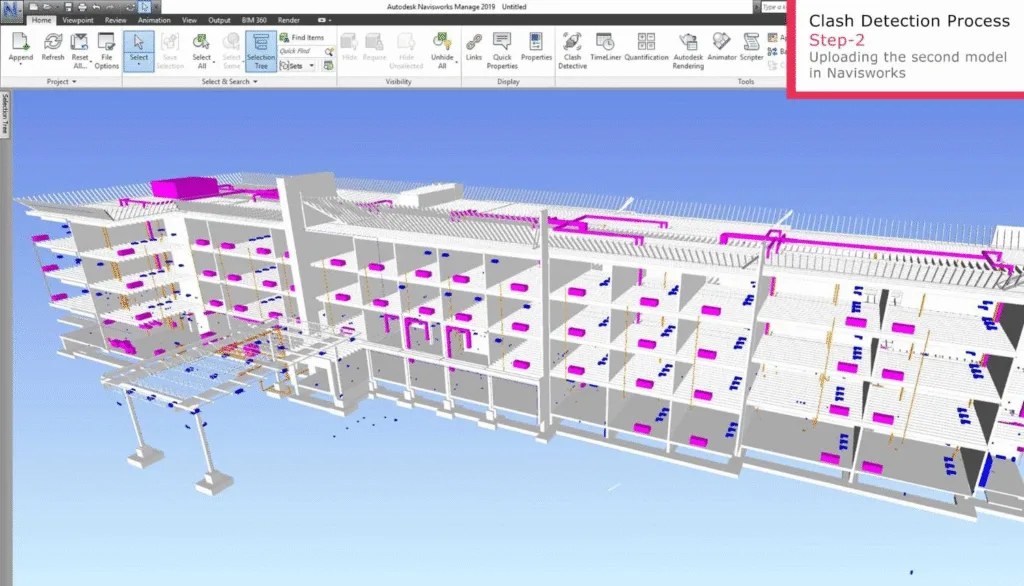
Creating a Revit Family also directly affects how accurately clashes are reviewed in the model. The role of software is to identify when building components begin to occupy the same physical space, long before anything reaches the job site.
Source: Kaarwan
You start seeing service runs clashing in spots where there simply isn’t enough room to install them properly. Ceiling depths interfere with duct placement. Structural framing blocks equipment access where clearance is required.
Common Challenges in Revit Family Creation
Building digital components for a project requires a high level of technical discipline to prevent errors in the master model. When a firm begins developing its own libraries, several operational hurdles can slow progress or compromise the quality of the building data.
Some of the major challenges in Revit family creation are:
Excessive File Weight
If a family for a simple chair or a valve contains thousands of small surfaces, the software must work harder to render the view. Such mismatches often lead to project crashes during large-scale coordination meetings involving multiple disciplines.
Inconsistent Labeling Standards
When different staff members name parts using their own methods, the project lists become disorganized. If one person labels a size as “Width” and another uses “W,” the software cannot group those items together, forcing teams to spend hours manually cleaning up the data.
Unreliable Resizing Logic
A Revit family should change size based on specific rules. But, poorly written formulas can cause the object to break when adjusted. If the connections are not applied correctly, a part might detach or deform when a user tries to resize it which makes the library untrustworthy for designers.
Limited Software Knowledge
Many design teams know how to draw buildings but not how to build detailed Revit components. Families get created with extra geometry, missing product data, and poor settings, which slows the model and affects information storage with the help of construction documentation service.
Future of Revit Family Creation in the US BIM Ecosystem
By 2026, automation in the modeling process will cut repetitive design time by nearly 40%. It shows that the future of digital components in the United States moves toward automation and live data. These assets are shifting from simple shapes to intelligent objects that track performance and supply chain changes in real time.
As more infrastructure, healthcare, and commercial builds depend on model-driven delivery, Revit Families will function less like design tools and more like data carriers. The future of BIM depends a lot on how you create Revit family based on the supporting procurement with installation and long-term building operations.
Conclusion
Outsourcing BIM modeling services act as a strategic move for U.S. firms to manage large-scale project data without increasing fixed overhead. By leveraging outsourced BIM services from India, firms can reduce modeling costs by up to 50% while accessing 24/7 production cycles.
This partnership ensures technical precision and scalability, allowing your internal team to focus on high-value design decisions and client management.